
GKE(Google Kubernetes Engine)에서는 Pod에서 전송되는 패킷의 소스 IP를 노드 IP로 변경하여 전송이 가능합니다. 이와 같이 목적지 IP를 변경하는 기술을 SNAT (Source NAT)라 하며, 노드 내 iptables의 Masquerade 규칙에 따라 결정됩니다.
1. GKE의 기본 SNAT 기능에 따른 SNAT 동작
GKE의 SNAT 동작 여부는 클러스터 설정 중 ‘기본 SNAT’ 활성화 여부에 따라 결정됩니다.
다음은 해당 기능의 활성화 여부에 따른 SNAT 동작 과정입니다.
- GKE 기본 SNAT 기능 활성화 여부에 따른 SNAT 동작
- 기본 SNAT 기능이 비활성화 된 경우
- 클러스터 내 ip-masq-agent Daemonset이 배포되지 않으며, 모든 패킷은 소스 Pod의 IP 주소를 유지합니다.
- 기본 SNAT 기능이 활성화 되어있으나 ip-masq-agent의 configmap 설정을 진행하지 않은 경우
- GKE 클러스터 구성시 기본 SNAT 기능이 활성화됨에 따라 클러스터에 자동으로 ip-masq-agent Daemonset이 배포 됩니다. 그러나 별도의 configmap 설정이 없으므로 기본 비매스커레이드 대상을 제외한 나머지 대역이 SNAT 대역으로 지정됩니다.
- 기본 SNAT 기능활성화 및 p-masq-agent의 configmap 설정을 완료 한 경우
- GKE 클러스터 구성시 기본 SNAT 기능을 활성화 하면 클러스터에 자동으로 ip-masq-agent Daemonset이 배포 됩니다. 또한 해당 Daemonset의 configmap 설정에 따라 SNAT 대역이 결정됩니다.
참고 – configmap을 지정하지 않았을때 설정되는 기본 비 매스커레이드 대역은 다음과 같으며, 해당 대역으로 전송되는 패킷은 Pod IP가 소스 IP로 유지됩니다. 또한 내부 메타데이터 서버 등으로 사용되는 링크-로컬 대역도 대상에 포함됩니다.
| 기본 비 마스커레이드 대역 | 링크-로컬 대역 |
| 10.0.0.0/8 172.16.0.0/12 192.168.0.0/16 100.64.0.0/10 192.0.0.0/24 192.0.2.0/24 192.88.99.0/24 198.18.0.0/15 198.51.100.0/24 203.0.113.0/24 240.0.0.0/4 | 169.254.0.0/16 |
2. GKE 내 SNAT 구성 방법
1). GKE 노드 내 iptables 설정 방식
- 각 노드에 SSH등을 통해 접근하여 root 권한으로 iptables에 Masquerade 규칙을 수동으로 추가하여 사용합니다.
ex) Pod IP 대역에서 Private Endpoint로 나가는 경우 SNAT 규칙을 추가
| Bash |
| # Iptables 규칙 추가 $ iptables -t nat -A POSTROUTING -s 100.64.0.0/16 -d 10.1.2.100 -j MASQUERADE # Iptables 규칙 삭제 $ iptables -t nat -D POSTROUTING -s 100.64.0.0/16 -d 10.1.2.100 -j MASQUERADE # Iptables 규칙 조회 $ iptables -t nat -L POSTROUTING -n -v –line-numbers |
- 장점
- 특정 대역에 대해서만 SNAT가 필요한 경우 사용 가능
- ip-masq-agent가 지원하지 않는 복잡한 규칙을 적용할 수 있음
ex) 특정 프로토콜만 허용, 로그 기록 등
- 각 노드별로 별개의 설정을 적용할 수 있음
- 단점
- 노드 재기동 및 재생성, 업데이트 등의 작업이 발생할때마다 새로 설정 필요
- GKE 내 다른 네트워크 에이전트들에 의해 초기화 혹은 재설정 될 가능성 존재
2). GKE ip-masq-agent configmap 적용
- 기본 SNAT 기능을 사용하여 ip-masq-agent Daemonset이 배포되어있다면, configmap을 적용하여 SNAT 대역을 관리할 수 있습니다.
ex) 10.1.1.0/24, 10.1.2.0/24 대역을 SNAT 대상에서 제외하는 경우
> configmap.yaml
| Yaml |
| apiVersion: v1 kind: ConfigMap metadata: name: ip-masq-agent namespace: kube-systemdata config: | nonMasqueradeCIDRS: – 10.1.1.0/24 – 10.1.2.0/24 masqLinkLocal : false #링크-로컬 대역을 SNAT 대역에 추가 여부 resyncInterval : 60s |
> ip-masq-agent용 configmap 생성
| Bash |
| $ kubectl create configmap ip-masq-agent –namespace=kube-system –from-file=config=configmap.yaml |
- 장점
- ip-masq-agent가 존재하는 모든 노드에 한번에 적용
- daemonset으로 구성되므로 노드 재기동 등의 작업이 발생하더라도 설정 유지
- 단점
- iptables에 비해 세밀한 규칙 설정이 불가능함
ex) nonMasqueradeCIDRs 만 추가 가능하며, SNAT를 실행할 대역을 직접 지정 불가
3. 구성 시나리오 – Private Endpoint 연결을 위한 GKE SNAT 설정
AS-IS
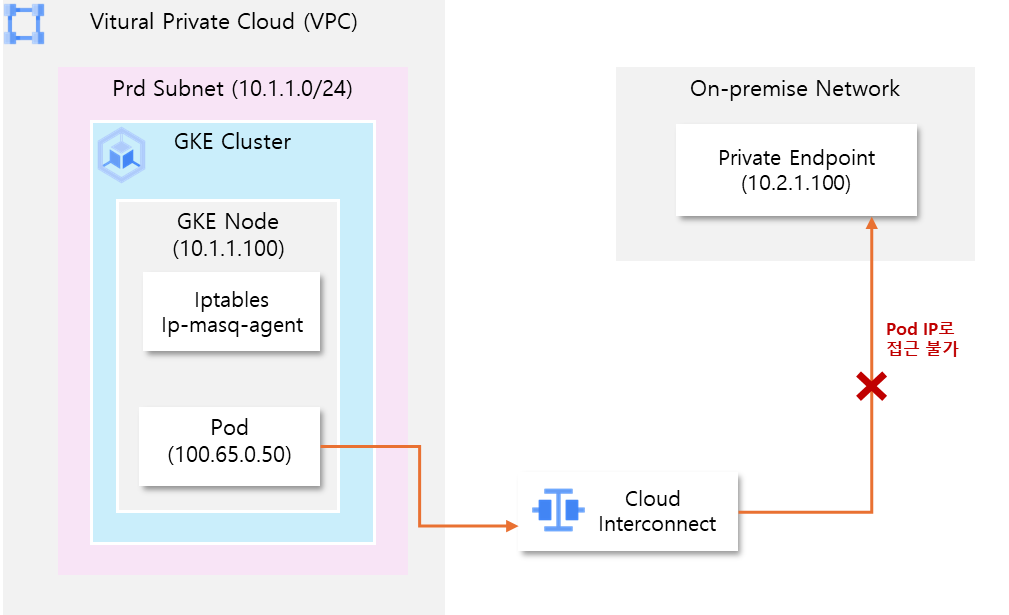
- On-premise 환경은 Cloud Interconnect를 통해 VPC와 직접 연결된 상태
- GKE 클러스터는 기본 SNAT 기능이 활성화되어 ip-masq-agent Daemonset이 배포되어있음
- GKE Pod에서 On-premise 환경 내에 구성된 Private Endpoint를 통해 API호출 필요
- 노드IP -> Private Endpoint간 연결은 가능하지만, Pod IP -> Private Endpoint는 연결 불가
- Private Endpoint의 대역이 10.0.0.0/8 대역에 포함되어 SNAT가 발생하지 않음
- On-premise Network 정책 상 Pod IP 대역을 허용하도록 설정 할 수 없음
- GKE 노드 내 Private Endpoint 연결 테스트
| Bash |
| $ nc -vz 10.2.1.100 443 (UNKNOWN) [10.2.1.100] 443 (https) open |
> 노드 상에서는 정상 연결 가능한 상태임을 확인
- GKE Pod 내 Private Endpoint 연결 테스트
1. 연결 테스트용 Pod 생성을 위한 yaml 파일 구성
> connection-test-pod.yaml
| yaml |
| apiVersion: v1 kind: Pod metadata: name: connection-test-pod spec: containers: – name: connection-test-pod image: nicolaka/netshoot # telnet, curl 등의 명령을 포함하는 이미지 command: [“sleep”, “3600”] |
2. 연결 테스트 용 Pod 생성
| Bash |
| $ kubectl apply -f connection-test-pod.yaml $ kubectl get pods -o wide | grep connection-test-podconnection-test-pod 1/1 Running 0 10s 100.65.0.50 [nodename] <none> <none> |
3. Pod 내에서 telnet 명령을 실행하여 연결 가능 여부 확인
| Bash |
| $ kubectl exec -it connection-test-pod – timeout 3 telnet 10.2.1.100 443 command terminated with exit code 143 |
> Pod IP로는 Private endpoint로 연결 불가능
TO-BE
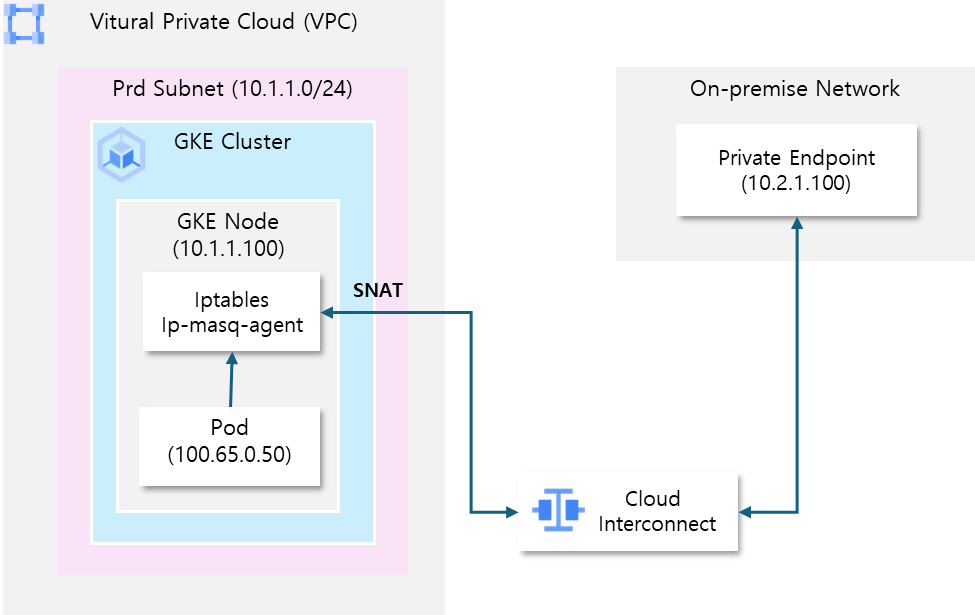
- ip-masq-agent의 configmap설정을 통해 각 노드에 적용
- Pod에서 Private Endpoint에 접근시 SNAT가 발생하여 소스 IP가 노드 IP로 변경되도록 설정
- ip-masq-agent 용 configmap yaml파일 구성
> configmap.yaml
| Yaml |
| apiVersion: v1 kind: ConfigMap metadata: name: ip-masq-agent namespace: kube-system data config: | nonMasqueradeCIDRS:# 10.0.0.0/8 대역 외 기본 비 마스커레이딩 영역은 유지 ( 기존 서비스 영향 최소화를 위함) – 172.16.0.0/12 – 192.168.0.0/16 – 100.64.0.0/10 – 192.0.0.0/24 – 192.0.2.0/24 – 192.88.99.0/24 – 198.18.0.0/15 – 198.51.100.0/24 – 203.0.113.0/24 – 240.0.0.0/4 # 운영 서브넷 대역을 추가 – 10.1.1.0/24 masqLinkLocal : false resyncInterval : 60s |
- kubectl 명령을 통해 configmap 생성
| Bash |
| $ kubectl create configmap ip-masq-agent –namespace=kube-system –from-file=config=configmap.yaml |
- 노드 내 iptables 규칙 적용 확인
– GKE Node에 접근 후 iptables를 확인
| Bash |
| $ iptables -t -nat -L IP-MASQ target port opt source destinationRETURN all – anywhere 172.16.0.0/12 /* ip-masq-agent: local traffic is not subject to MASQUERADE*/ RETURN all – anywhere 192.168.0.0/16 /* ip-masq-agent: local traffic is not subject to MASQUERADE */ RETURN all – anywhere 100.64.0.0/10 /* ip-masq-agent: local traffic is not subject to MASQUERADE*/ RETURN all – anywhere 192.0.0.0/24 /* ip-masq-agent: local traffic is not subject to MASQUERADE */ RETURN all – anywhere 192.0.2.0/24 /* ip-masq-agent: local traffic is not subject to MASQUERADE */ RETURN all – anywhere 192.88.99.0/24 /* ip-masq-agent: local traffic is not subject to MASQUERADE */ RETURN all – anywhere 198.18.0.0/15 /* ip-masq-agent: local traffic is not subject to MASQUERADE */ RETURN all – anywhere 198.51.100.0/24 /* ip-masq-agent: local traffic is not subject to MASQUERADE*/ RETURN all – anywhere 203.0.113.0/24 /* ip-masq-agent: local traffic is not subject to MASQUERADE */ RETURN all – anywhere 240.0.0.0/4 /* ip-masq-agent: local traffic is not subject to MASQUERADE */ RETURN all – anywhere 10.1.1.0/24 /* ip-masq-agent: local traffic is not subject to MASQUERADE */ MASQUERADE all – anywhere anywhere /* ip-masq-agnet: outbound traffic is subject to MASQUERADE (must be last chain) */ random-fully |
4. Pod 내에서 telnet 명령을 실행하여 연결 가능 여부 확인
| Bash |
| $ kubectl exec -it connection-test-pod – timeout 3 telnet 10.2.1.100 443 Trying 10.2.1.100 … Connected to 10.2.1.100. |
> Pod내에서 Private Endpoint 연결시 SNAT 가 발생하여 정상 연결 확인